Elastic Triangle Splatting
* Equal contribution.
arXiv 2026
Abstract
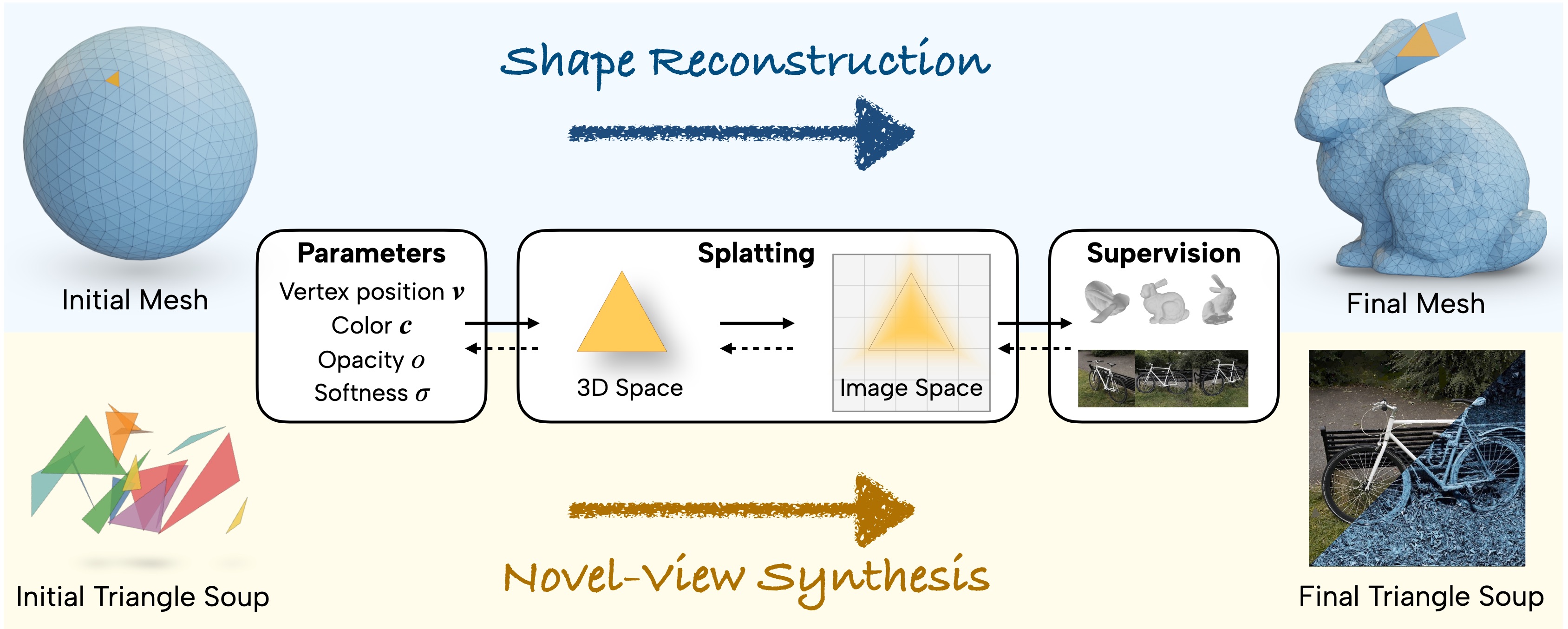
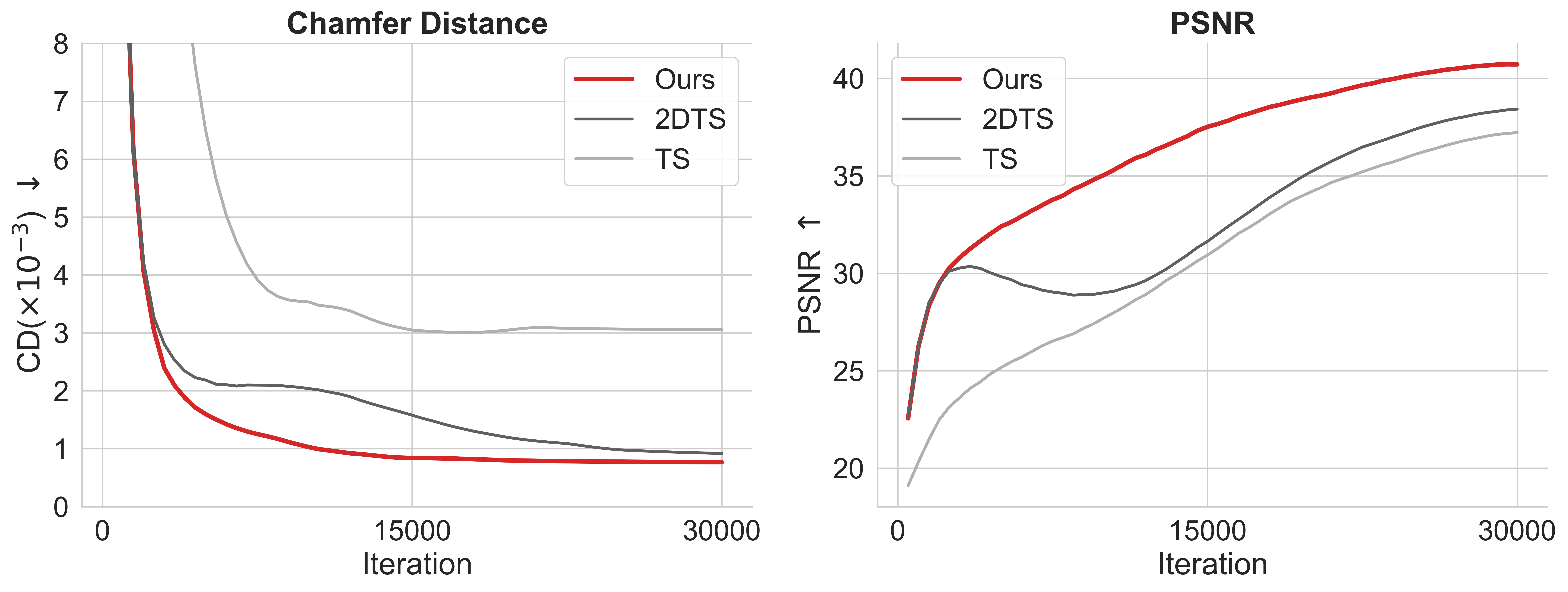
While neural rendering methods such as 3D Gaussian Splatting achieve remarkable visual fidelity, traditional polygonal meshes remain the backbone of established graphics pipelines. Triangle splatting bridges this gap by optimizing triangle primitives as differentiable splats, producing representations that are closer to mesh-based workflows. Central to these methods is the kernel function that softens triangle boundaries to propagate gradients to vertex positions. Existing triangle splatting methods make inconsistent choices of kernel functions, and analysis on these kernels’ optimization behavior has been limited to unstructured triangle soups for novel-view synthesis. In this work, we consider triangle splatting as a generic tool for photometric optimization, comparing kernel properties through two complementary tasks: mesh optimization for shape reconstruction and triangle soup optimization for novel-view synthesis. Along with the analysis, we introduce an elastic kernel function that features bilateral gradient support across the boundary and flexible values on the edge, which are shown to be essential to robust optimization. Under isolated comparison, our elastic kernel outperforms existing kernels on shape reconstruction and in the majority of novel-view synthesis benchmarks, demonstrating the importance of kernel design in the effectiveness and versatility of triangle splatting.
Kernel Functions
We identify two key properties of kernel functions that are essential for robust optimization:
-
Bilateral gradient support across the triangle boundary ensures that gradients are propagated to vertex positions even when the triangle is small or far away.
-
Flexible value on the edge maintains constant visual size of a softened triangle and prevents edge artifacts between hard boundaries (see referenced figure).
Shape Reconstruction
Armadillo
View state
- Drag to orbit.
- Scroll or pinch to zoom.
- Right-drag, Shift-drag, or two-finger drag to pan.
- Double-click or double-tap to set the orbit center.
View state
- Drag to orbit.
- Scroll or pinch to zoom.
- Right-drag, Shift-drag, or two-finger drag to pan.
- Double-click or double-tap to set the orbit center.
View state
- Drag to orbit.
- Scroll or pinch to zoom.
- Right-drag, Shift-drag, or two-finger drag to pan.
- Double-click or double-tap to set the orbit center.
View state
- Drag to orbit.
- Scroll or pinch to zoom.
- Right-drag, Shift-drag, or two-finger drag to pan.
- Double-click or double-tap to set the orbit center.
View state
- Drag to orbit.
- Scroll or pinch to zoom.
- Right-drag, Shift-drag, or two-finger drag to pan.
- Double-click or double-tap to set the orbit center.
View state
- Drag to orbit.
- Scroll or pinch to zoom.
- Right-drag, Shift-drag, or two-finger drag to pan.
- Double-click or double-tap to set the orbit center.
View state
- Drag to orbit.
- Scroll or pinch to zoom.
- Right-drag, Shift-drag, or two-finger drag to pan.
- Double-click or double-tap to set the orbit center.
View state
- Drag to orbit.
- Scroll or pinch to zoom.
- Right-drag, Shift-drag, or two-finger drag to pan.
- Double-click or double-tap to set the orbit center.
View state
- Drag to orbit.
- Scroll or pinch to zoom.
- Right-drag, Shift-drag, or two-finger drag to pan.
- Double-click or double-tap to set the orbit center.
View state
- Drag to orbit.
- Scroll or pinch to zoom.
- Right-drag, Shift-drag, or two-finger drag to pan.
- Double-click or double-tap to set the orbit center.
View state
- Drag to orbit.
- Scroll or pinch to zoom.
- Right-drag, Shift-drag, or two-finger drag to pan.
- Double-click or double-tap to set the orbit center.
View state
- Drag to orbit.
- Scroll or pinch to zoom.
- Right-drag, Shift-drag, or two-finger drag to pan.
- Double-click or double-tap to set the orbit center.
View state
- Drag to orbit.
- Scroll or pinch to zoom.
- Right-drag, Shift-drag, or two-finger drag to pan.
- Double-click or double-tap to set the orbit center.
View state
- Drag to orbit.
- Scroll or pinch to zoom.
- Right-drag, Shift-drag, or two-finger drag to pan.
- Double-click or double-tap to set the orbit center.
View state
- Drag to orbit.
- Scroll or pinch to zoom.
- Right-drag, Shift-drag, or two-finger drag to pan.
- Double-click or double-tap to set the orbit center.
View state
- Drag to orbit.
- Scroll or pinch to zoom.
- Right-drag, Shift-drag, or two-finger drag to pan.
- Double-click or double-tap to set the orbit center.
View state
- Drag to orbit.
- Scroll or pinch to zoom.
- Right-drag, Shift-drag, or two-finger drag to pan.
- Double-click or double-tap to set the orbit center.
View state
- Drag to orbit.
- Scroll or pinch to zoom.
- Right-drag, Shift-drag, or two-finger drag to pan.
- Double-click or double-tap to set the orbit center.
View state
- Drag to orbit.
- Scroll or pinch to zoom.
- Right-drag, Shift-drag, or two-finger drag to pan.
- Double-click or double-tap to set the orbit center.
View state
- Drag to orbit.
- Scroll or pinch to zoom.
- Right-drag, Shift-drag, or two-finger drag to pan.
- Double-click or double-tap to set the orbit center.
View state
- Drag to orbit.
- Scroll or pinch to zoom.
- Right-drag, Shift-drag, or two-finger drag to pan.
- Double-click or double-tap to set the orbit center.
View state
- Drag to orbit.
- Scroll or pinch to zoom.
- Right-drag, Shift-drag, or two-finger drag to pan.
- Double-click or double-tap to set the orbit center.
View state
- Drag to orbit.
- Scroll or pinch to zoom.
- Right-drag, Shift-drag, or two-finger drag to pan.
- Double-click or double-tap to set the orbit center.
View state
- Drag to orbit.
- Scroll or pinch to zoom.
- Right-drag, Shift-drag, or two-finger drag to pan.
- Double-click or double-tap to set the orbit center.
View state
- Drag to orbit.
- Scroll or pinch to zoom.
- Right-drag, Shift-drag, or two-finger drag to pan.
- Double-click or double-tap to set the orbit center.
View state
- Drag to orbit.
- Scroll or pinch to zoom.
- Right-drag, Shift-drag, or two-finger drag to pan.
- Double-click or double-tap to set the orbit center.
View state
- Drag to orbit.
- Scroll or pinch to zoom.
- Right-drag, Shift-drag, or two-finger drag to pan.
- Double-click or double-tap to set the orbit center.
View state
- Drag to orbit.
- Scroll or pinch to zoom.
- Right-drag, Shift-drag, or two-finger drag to pan.
- Double-click or double-tap to set the orbit center.
View state
- Drag to orbit.
- Scroll or pinch to zoom.
- Right-drag, Shift-drag, or two-finger drag to pan.
- Double-click or double-tap to set the orbit center.
View state
- Drag to orbit.
- Scroll or pinch to zoom.
- Right-drag, Shift-drag, or two-finger drag to pan.
- Double-click or double-tap to set the orbit center.
View state
- Drag to orbit.
- Scroll or pinch to zoom.
- Right-drag, Shift-drag, or two-finger drag to pan.
- Double-click or double-tap to set the orbit center.
View state
- Drag to orbit.
- Scroll or pinch to zoom.
- Right-drag, Shift-drag, or two-finger drag to pan.
- Double-click or double-tap to set the orbit center.
View state
- Drag to orbit.
- Scroll or pinch to zoom.
- Right-drag, Shift-drag, or two-finger drag to pan.
- Double-click or double-tap to set the orbit center.
View state
- Drag to orbit.
- Scroll or pinch to zoom.
- Right-drag, Shift-drag, or two-finger drag to pan.
- Double-click or double-tap to set the orbit center.
View state
- Drag to orbit.
- Scroll or pinch to zoom.
- Right-drag, Shift-drag, or two-finger drag to pan.
- Double-click or double-tap to set the orbit center.
View state
- Drag to orbit.
- Scroll or pinch to zoom.
- Right-drag, Shift-drag, or two-finger drag to pan.
- Double-click or double-tap to set the orbit center.
View state
- Drag to orbit.
- Scroll or pinch to zoom.
- Right-drag, Shift-drag, or two-finger drag to pan.
- Double-click or double-tap to set the orbit center.
View state
- Drag to orbit.
- Scroll or pinch to zoom.
- Right-drag, Shift-drag, or two-finger drag to pan.
- Double-click or double-tap to set the orbit center.
View state
- Drag to orbit.
- Scroll or pinch to zoom.
- Right-drag, Shift-drag, or two-finger drag to pan.
- Double-click or double-tap to set the orbit center.
View state
- Drag to orbit.
- Scroll or pinch to zoom.
- Right-drag, Shift-drag, or two-finger drag to pan.
- Double-click or double-tap to set the orbit center.
View state
- Drag to orbit.
- Scroll or pinch to zoom.
- Right-drag, Shift-drag, or two-finger drag to pan.
- Double-click or double-tap to set the orbit center.
View state
- Drag to orbit.
- Scroll or pinch to zoom.
- Right-drag, Shift-drag, or two-finger drag to pan.
- Double-click or double-tap to set the orbit center.
View state
- Drag to orbit.
- Scroll or pinch to zoom.
- Right-drag, Shift-drag, or two-finger drag to pan.
- Double-click or double-tap to set the orbit center.
View state
- Drag to orbit.
- Scroll or pinch to zoom.
- Right-drag, Shift-drag, or two-finger drag to pan.
- Double-click or double-tap to set the orbit center.
View state
- Drag to orbit.
- Scroll or pinch to zoom.
- Right-drag, Shift-drag, or two-finger drag to pan.
- Double-click or double-tap to set the orbit center.
View state
- Drag to orbit.
- Scroll or pinch to zoom.
- Right-drag, Shift-drag, or two-finger drag to pan.
- Double-click or double-tap to set the orbit center.
View state
- Drag to orbit.
- Scroll or pinch to zoom.
- Right-drag, Shift-drag, or two-finger drag to pan.
- Double-click or double-tap to set the orbit center.
View state
- Drag to orbit.
- Scroll or pinch to zoom.
- Right-drag, Shift-drag, or two-finger drag to pan.
- Double-click or double-tap to set the orbit center.
View state
- Drag to orbit.
- Scroll or pinch to zoom.
- Right-drag, Shift-drag, or two-finger drag to pan.
- Double-click or double-tap to set the orbit center.
View state
- Drag to orbit.
- Scroll or pinch to zoom.
- Right-drag, Shift-drag, or two-finger drag to pan.
- Double-click or double-tap to set the orbit center.
View state
- Drag to orbit.
- Scroll or pinch to zoom.
- Right-drag, Shift-drag, or two-finger drag to pan.
- Double-click or double-tap to set the orbit center.
View state
- Drag to orbit.
- Scroll or pinch to zoom.
- Right-drag, Shift-drag, or two-finger drag to pan.
- Double-click or double-tap to set the orbit center.
View state
- Drag to orbit.
- Scroll or pinch to zoom.
- Right-drag, Shift-drag, or two-finger drag to pan.
- Double-click or double-tap to set the orbit center.
View state
- Drag to orbit.
- Scroll or pinch to zoom.
- Right-drag, Shift-drag, or two-finger drag to pan.
- Double-click or double-tap to set the orbit center.
View state
- Drag to orbit.
- Scroll or pinch to zoom.
- Right-drag, Shift-drag, or two-finger drag to pan.
- Double-click or double-tap to set the orbit center.
View state
- Drag to orbit.
- Scroll or pinch to zoom.
- Right-drag, Shift-drag, or two-finger drag to pan.
- Double-click or double-tap to set the orbit center.
View state
- Drag to orbit.
- Scroll or pinch to zoom.
- Right-drag, Shift-drag, or two-finger drag to pan.
- Double-click or double-tap to set the orbit center.
View state
- Drag to orbit.
- Scroll or pinch to zoom.
- Right-drag, Shift-drag, or two-finger drag to pan.
- Double-click or double-tap to set the orbit center.
View state
- Drag to orbit.
- Scroll or pinch to zoom.
- Right-drag, Shift-drag, or two-finger drag to pan.
- Double-click or double-tap to set the orbit center.
View state
- Drag to orbit.
- Scroll or pinch to zoom.
- Right-drag, Shift-drag, or two-finger drag to pan.
- Double-click or double-tap to set the orbit center.
View state
- Drag to orbit.
- Scroll or pinch to zoom.
- Right-drag, Shift-drag, or two-finger drag to pan.
- Double-click or double-tap to set the orbit center.
View state
- Drag to orbit.
- Scroll or pinch to zoom.
- Right-drag, Shift-drag, or two-finger drag to pan.
- Double-click or double-tap to set the orbit center.
View state
- Drag to orbit.
- Scroll or pinch to zoom.
- Right-drag, Shift-drag, or two-finger drag to pan.
- Double-click or double-tap to set the orbit center.
View state
- Drag to orbit.
- Scroll or pinch to zoom.
- Right-drag, Shift-drag, or two-finger drag to pan.
- Double-click or double-tap to set the orbit center.
View state
- Drag to orbit.
- Scroll or pinch to zoom.
- Right-drag, Shift-drag, or two-finger drag to pan.
- Double-click or double-tap to set the orbit center.
View state
- Drag to orbit.
- Scroll or pinch to zoom.
- Right-drag, Shift-drag, or two-finger drag to pan.
- Double-click or double-tap to set the orbit center.
View state
- Drag to orbit.
- Scroll or pinch to zoom.
- Right-drag, Shift-drag, or two-finger drag to pan.
- Double-click or double-tap to set the orbit center.
View state
- Drag to orbit.
- Scroll or pinch to zoom.
- Right-drag, Shift-drag, or two-finger drag to pan.
- Double-click or double-tap to set the orbit center.
View state
- Drag to orbit.
- Scroll or pinch to zoom.
- Right-drag, Shift-drag, or two-finger drag to pan.
- Double-click or double-tap to set the orbit center.
View state
- Drag to orbit.
- Scroll or pinch to zoom.
- Right-drag, Shift-drag, or two-finger drag to pan.
- Double-click or double-tap to set the orbit center.
View state
- Drag to orbit.
- Scroll or pinch to zoom.
- Right-drag, Shift-drag, or two-finger drag to pan.
- Double-click or double-tap to set the orbit center.
View state
- Drag to orbit.
- Scroll or pinch to zoom.
- Right-drag, Shift-drag, or two-finger drag to pan.
- Double-click or double-tap to set the orbit center.
View state
- Drag to orbit.
- Scroll or pinch to zoom.
- Right-drag, Shift-drag, or two-finger drag to pan.
- Double-click or double-tap to set the orbit center.
View state
- Drag to orbit.
- Scroll or pinch to zoom.
- Right-drag, Shift-drag, or two-finger drag to pan.
- Double-click or double-tap to set the orbit center.
View state
- Drag to orbit.
- Scroll or pinch to zoom.
- Right-drag, Shift-drag, or two-finger drag to pan.
- Double-click or double-tap to set the orbit center.
View state
- Drag to orbit.
- Scroll or pinch to zoom.
- Right-drag, Shift-drag, or two-finger drag to pan.
- Double-click or double-tap to set the orbit center.
View state
- Drag to orbit.
- Scroll or pinch to zoom.
- Right-drag, Shift-drag, or two-finger drag to pan.
- Double-click or double-tap to set the orbit center.
View state
- Drag to orbit.
- Scroll or pinch to zoom.
- Right-drag, Shift-drag, or two-finger drag to pan.
- Double-click or double-tap to set the orbit center.
View state
- Drag to orbit.
- Scroll or pinch to zoom.
- Right-drag, Shift-drag, or two-finger drag to pan.
- Double-click or double-tap to set the orbit center.
View state
- Drag to orbit.
- Scroll or pinch to zoom.
- Right-drag, Shift-drag, or two-finger drag to pan.
- Double-click or double-tap to set the orbit center.
View state
- Drag to orbit.
- Scroll or pinch to zoom.
- Right-drag, Shift-drag, or two-finger drag to pan.
- Double-click or double-tap to set the orbit center.
View state
- Drag to orbit.
- Scroll or pinch to zoom.
- Right-drag, Shift-drag, or two-finger drag to pan.
- Double-click or double-tap to set the orbit center.
View state
- Drag to orbit.
- Scroll or pinch to zoom.
- Right-drag, Shift-drag, or two-finger drag to pan.
- Double-click or double-tap to set the orbit center.
View state
- Drag to orbit.
- Scroll or pinch to zoom.
- Right-drag, Shift-drag, or two-finger drag to pan.
- Double-click or double-tap to set the orbit center.
Novel-View Synthesis
| Method | Mip-NeRF 360 | Tanks&Temples | Deep Blending | ||||||
|---|---|---|---|---|---|---|---|---|---|
| PSNR↑ | SSIM↑ | LPIPS↓ | PSNR↑ | SSIM↑ | LPIPS↓ | PSNR↑ | SSIM↑ | LPIPS↓ | |
| 3DGS | 27.58 | 0.813 | 0.220 | 23.83 | 0.853 | 0.169 | 29.79 | 0.910 | 0.238 |
| 2DGS | 26.82 | 0.794 | 0.260 | 23.19 | 0.833 | 0.212 | 29.53 | 0.900 | 0.256 |
| TS | 27.02 | 0.804 | 0.200 | 23.10 | 0.855 | 0.144 | 29.02 | 0.891 | 0.242 |
| 2DTS | 27.16 | 0.808 | 0.194 | 23.00 | 0.851 | 0.143 | 29.20 | 0.895 | 0.229 |
| Ours | 27.33 | 0.813 | 0.189 | 23.08 | 0.858 | 0.134 | 29.27 | 0.898 | 0.224 |
Colored Triangle Soup
View state
- Drag to orbit.
- Scroll or pinch to zoom.
- Right-drag, Shift-drag, or two-finger drag to pan.
- Double-click or double-tap to set the orbit center.
View state
- Drag to orbit.
- Scroll or pinch to zoom.
- Right-drag, Shift-drag, or two-finger drag to pan.
- Double-click or double-tap to set the orbit center.
View state
- Drag to orbit.
- Scroll or pinch to zoom.
- Right-drag, Shift-drag, or two-finger drag to pan.
- Double-click or double-tap to set the orbit center.
Acknowledgments
This project follows Triangle Splatting and 2DTS. We sincerely thank their authors for pioneering the research and sharing their code.
This work was supported by the ERC Advanced Grant “SIMULACRON” (agreement #884679), the GNI Project “AI4Twinning”, and the DFG project CR 250/26-1 “4DYoutube”.